
Notice2 min read
Hello Daevas! This is AION 2 Global.
Depending on the policies of your card issuer and bank, as well as our payment provider Xsolla, you may be required to complete a one-time verification process when making your first payment.
Once you complete this verification, you can make future payments faster and more conveniently without entering your card number each time.
We understand that this may be a little inconvenient, but please refer to the guide below to complete your payment securely.
Thank you.
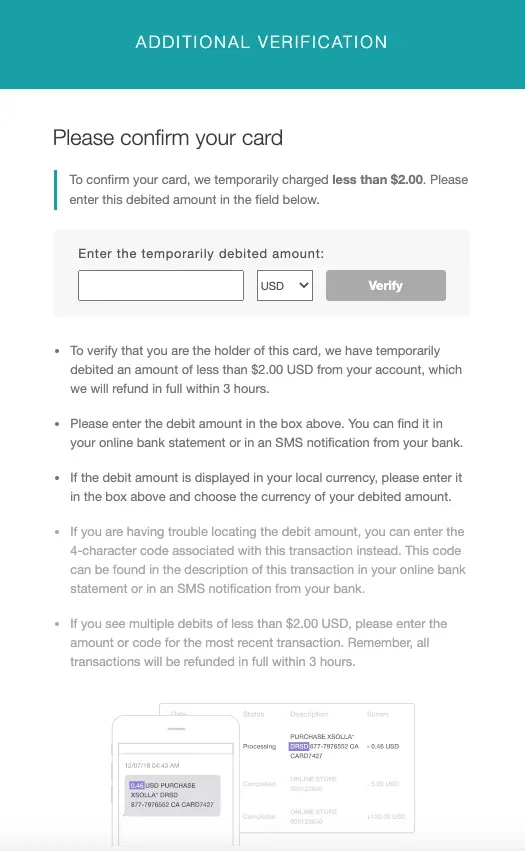
- Example of Additional Verification Screen
※ Users of global card brands, including Visa, Mastercard, AMEX, and JCB, may be redirected to the card issuer's secure verification page (3D Secure).
- Additional Verification Guide
-
Users of global card brands, including Visa, Mastercard, AMEX, and JCB, may need to complete additional verification on the card issuer's secure verification page (3D Secure).
-
If you enter the correct code or amount and successfully verify your card, the pending authorization amount will be canceled and refunded immediately.
-
Any pending authorization not used for verification will be canceled automatically after 3 hours.
(The time required for the cancellation or refund to appear in your account may vary, depending on your bank's policies.)
-
You have a total of 3 attempts. If you enter the incorrect amount all 3 times, the payment will be canceled automatically by the fraud detection system of the payment provider.
-
The verification amount is valid for only 3 hours. If you do not complete verification within this period, you must attempt a new payment to receive a new verification amount.
-
Debit cards can also be used if sufficient funds are available.
(※ Gift cards and prepaid cards are not supported.)
- Related Q&A
Q1. What should I do if I cannot check the verification amount?
- Check how you currently receive notifications about card authorizations.
If you cannot check the authorized amount through your card issuer's app, online banking, SMS, or e-mail, please contact your bank.
Q2. What should I do if I entered the amount but the transaction was declined?
- This means that the transaction was declined by the fraud detection system. Please contact Xsolla Customer Support. ([email protected])
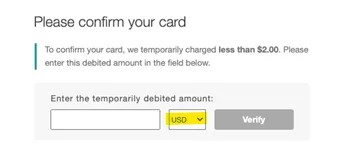
Q3. The verification amount was authorized in a currency other than USD.
- Open the dropdown menu shown below and select the currency in which the amount was authorized.
If the authorized currency does not appear in the list, please contact Xsolla Customer Support. ([email protected])
Thank you.
Comments0
Nobody has written here yet.