
ประกาศอ่าน 1 นาที
We would like to provide information regarding the PURPLE region settings required when accessing the AION2 Global Service.
When using PURPLE from the countries and regions listed below, AION2 may not appear in your game list depending on your PURPLE region settings.
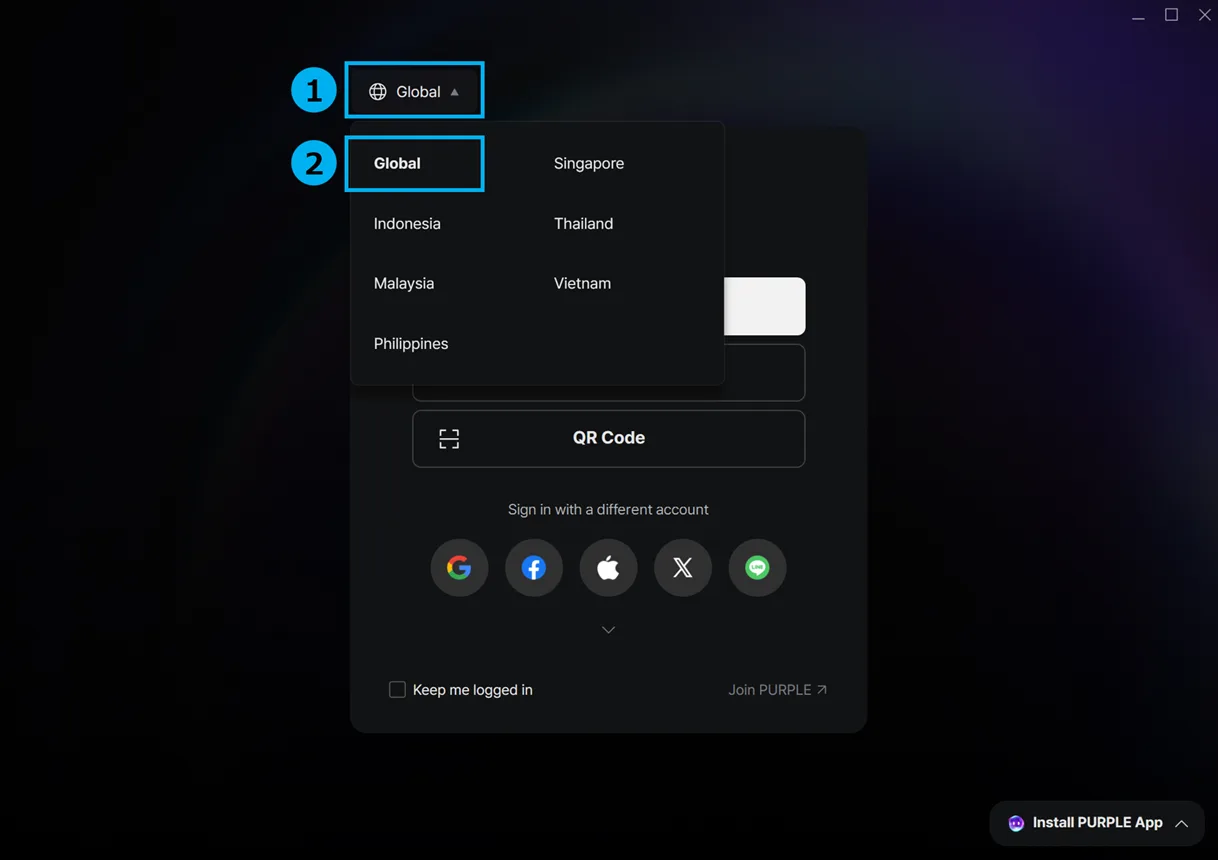
If you are playing AION2 from one of the applicable countries or regions, please change your PURPLE region setting to “Global” before launching the game.
Applicable Countries and Regions
-
Indonesia
-
Malaysia
-
Philippines
-
Singapore
-
Thailand
How to Change Your PURPLE Region Setting
-
Launch PURPLE.
-
Check your current PURPLE region setting.
-
If your current country or region is selected, change the setting to “Global.”
-
After changing the setting, confirm that AION2 appears in your game list.
※ You may need to restart PURPLE after changing the region setting.
We apologize for any inconvenience this may cause and kindly ask users in the applicable countries and regions to check their PURPLE region settings before accessing AION2.
Thank you for your continued support of AION2.

ความคิดเห็น0
ยังไม่มีใครเขียนที่นี่